
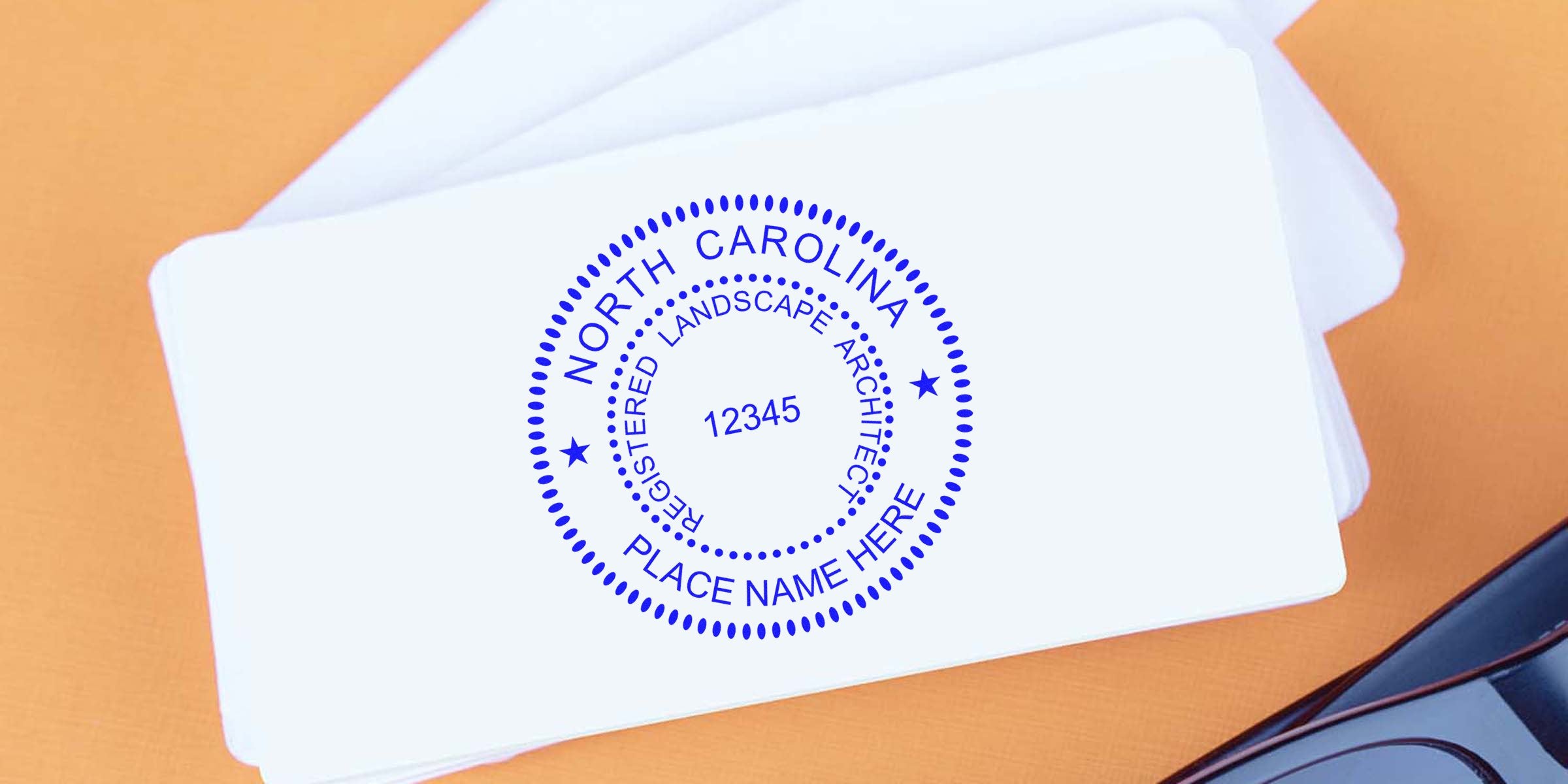
Creating your own North Carolina landscape architect seal template might sound a bit technical, but once you break it down, it’s more manageable than you think. The right seal plays a crucial role in verifying your credentials, keeping your projects compliant with state regulations, and making you look downright professional. In this post, you’ll learn how to design your seal template step by step, pick the ideal tools to create it, and make sure you stay on the right side of North Carolina regulations. Let’s dive in.
Recognize the Value of Seals
An official landscape architect seal tells clients, local agencies, and the general public that you’re not just skilled but also properly licensed. In North Carolina, that seal frames your identity as a trusted professional and ensures any documentation you sign is immediately recognized as legitimate.
- It sets you apart from unlicensed practitioners.
- It confirms your compliance with North Carolina’s legal requirements.
- It helps clients see you as dependable and dedicated to high-quality work.
When your paperwork includes a clearly visible seal, it can speed up approvals for permits, clarify accountability, and lend more credibility to your brand. You’ll notice that government bodies, private contractors, and even your clients feel better knowing they’re working with a state-licensed professional who’s dedicated to established standards.
Follow North Carolina Standards
Before you break out your digital design tools, it’s a smart move to learn about the official guidelines for North Carolina landscape architect stamps and seals. The North Carolina Board of Landscape Architects has its own specifics on shape, size, and layout.
If you’d like more details on sizing, required text, or any other official do’s and don’ts, have a look at the North Carolina landscape architect stamp requirements. You’ll find a breakdown of board-approved rules that clarify how each seal must be labeled and sized.
Core Regulatory Points
- The seal typically must contain your name as it appears on your license.
- The term “Registered Landscape Architect” should be present.
- There may be mandatory references to “State of North Carolina.”
Double-check each detail. After all, a seal that doesn’t comply could lead to project delays or official headaches. You want your seal to be correct the first time.
Design Your Required Elements
Every North Carolina landscape architect seal includes key text and design features. The most common shape is circular because it’s easy to recognize, but if the board allows alternative shapes, you might see square or rectangular seals in some other fields. For landscape architects specifically, circles or circle-like designs tend to be the go-to.
Standard Inclusions
-
Circular Layout
- The outer ring often carries “State of North Carolina” or “North Carolina State Board of Landscape Architects.”
- The inner ring usually features “Registered Landscape Architect,” plus space for your name and license number.
-
License Number
- This is typically placed near the center so it stands out.
- If you have multiple license numbers in various states, keep your North Carolina number clearly identified.
-
Full Name
- Use the name printed on your state license.
- Avoid nicknames or abbreviations unless they appear on your official license document.
Make It Legible
People usually underestimate the importance of readability. If you choose fancy fonts or layout elements, you risk making the seal appear cluttered and hard to read. Always stick to plain, clear text and spacing, ensuring every detail is readable in both print and digital formats.
Pick Your Tools Carefully
Designing a seal template doesn’t require fancy software. You could go with user-friendly tools like Adobe Illustrator, CorelDRAW, or even online design platforms. The main goal is to create a high-resolution image or vector file that maintains clarity when you resize or reproduce it.
Popular Design Tools
- Adobe Illustrator
This is a top pick for vector-based artwork. With Illustrator, you can craft precise shapes, crisp lines, and text that looks professional. - CorelDRAW
Similar in scope to Illustrator, CorelDRAW offers robust vector design features. - Online Platforms
Tools like Canva or other cloud-based design programs can be enough if they allow vector export or high-resolution PNGs.
Vector vs. Raster
- Vector Format
A vector-based file (like .ai, .eps, or .svg) can be resized without losing quality. This future-proofs your design. - Raster Format
A raster file (like .jpg or .png) can suffer from pixelation if blown up too large, but it’s perfectly fine for single print jobs or purely digital use at a consistent size.
Many people like to start their design in a vector format, then export to a PNG for everyday use. You’ll appreciate the fluidity of a vector file later if you ever want to adjust your layout or scale it up.
Create a Digital Template
With your design tools ready, it’s time to put them into action. A digital template means you can repeatedly update or adapt the seal for any new licensing details without starting from scratch. You may need quick edits if your license number changes or if a new law tweaks the text requirement.
Steps to Build Your Template
-
Set Your Canvas
- Start with a blank canvas sized at least 500 x 500 pixels (or a suitable vector artboard).
- Choose a circular guideline if your seal will be round.
-
Position Outer Text
- Place “State of North Carolina” around the perimeter.
- Adjust spacing so the text forms a perfect ring without overlapping.
-
Add Inner Text
- Insert “Registered Landscape Architect” in another circular arc inside the first ring.
- Preserve consistent spacing for a clean look.
-
Incorporate Your Name and Number
- Center your name and license number.
- Check alignment so everything is symmetrical.
-
Review and Test Print
- Print a small test version.
- Check whether all text is readable at a normal viewing distance.
This basic process gives you a workable master file, so you can export into the format you need. Some software solutions even offer “lock” features, preventing accidental changes on crucial elements like the circle or the text arcs.
Free Digital Seal Option
If you’d rather not spend time creating an entire template from scratch, you might appreciate that Acorn Sales, a trusted supplier with over 60 years in the stamping and sealing business, often provides a free digital seal with your order. That gives you a ready-to-use file that follows your state’s guidelines. It’s a sweet time-saver if you’d like to avoid design hassles.
Print And Use Your Seal
Once you have a finalized template, you might want a physical stamp or embosser to use on official documents. Digital seals are perfect for electronic submissions or PDFs, but in many cases, physically stamping your papers is still the gold standard in architecture and engineering fields.
Physical Production Steps
-
Choose Your Stamp Style
- Self-inking stamps are convenient and mess-free.
- Pre-inked stamps often produce crisper impressions.
- Embossers leave a raised seal, which some professionals prefer for added authenticity.
-
Verify Dimensions
- Compare the stamp’s impression size with the exact specs from the board.
- Too large or too small, and you could end up reordering.
-
Check for Test Impressions
- Before ordering in bulk, get a proof or sample impression.
- Make sure the text is sharp and everything lines up properly.
When to Use Each Format
- Physical Stamp
Great for plans, official letters, and any document that might look more legit with a visible ink impression. - Embossed Seal
Ideal when you need heightened authenticity. The raised impression can be felt by touch, reassuring clients and agencies. - Digital Seal
Perfect for e-submissions and any document you plan to distribute online.
In some municipalities, digital seals are accepted for e-signed PDFs, but always double-check with the relevant local authority to avoid rejections.
Avoid Common Pitfalls
Even a small oversight in your seal design or usage can be problematic. Let’s keep you ahead of the curve so you don’t have to redo an entire project.
-
Skipping Official Guidelines
Make sure every piece of text and shape matches current North Carolina board requirements. -
Using Low-Resolution Files
Pixelated or fuzzy seals look unprofessional and may not be accepted. -
Overly Fancy Fonts
Cursive or decorative typefaces can lead to confusion. Stick with crisp, legible fonts. -
Incorrect Text
If you include a misprint in your professional title or license number, it might invalidate your documents.
Whenever you wonder if your seal is correct, refer to the official guidelines or check with the North Carolina licensing board. It’s better to ask questions early than to discover a big mistake after thousands of prints.
Collaborate With a Trusted Supplier
It’s tempting to go the do-it-yourself route for your stamp or embosser. Yet, a professional supplier ensures your final physical product meets quality standards, especially if something in your design is off. Acorn Sales, for instance, has been helping architects, engineers, and other professionals for over 60 years. They understand North Carolina’s official requirements and can guide you toward a stamp, embosser, or digital file that matches these standards exactly.
-
Experience Counts
Sixty years in the business means they’ve mastered every detail from text alignment to impression clarity. -
Free Digital Seal
Many of their stamp packages come with a free digital seal, so you don’t have to fuss with a million design tools. -
Quality Assurance
Working with a reputable vendor means your stamp or embosser arrives correct the first time.
You can even ask them for guidance on updates, reorders, or additional states you might be licensed in. A simple conversation with an experienced supplier goes a long way toward saving you both time and worry.
With a crisp seal that passes official checks, your proposals and plans will leave a strong and professional impression every single time. Designing a North Carolina landscape architect seal template can be done quickly if you follow these guidelines, pick quality tools, and consider working with a proven supplier like Acorn Sales. You’ll not only fulfill the state’s requirements but also demonstrate the polished expertise your clients expect. Good luck creating your seal, and here’s to many successful projects ahead!
Frequently Asked Questions
Do I Really Need a North Carolina Landscape Architect Seal?
Yes. A seal is mandatory for licensed landscape architects in North Carolina when signing and sealing official documents. It validates that the drawings and specifications are produced by a registered professional who meets the board’s standards.
Can I Just Use a Digital Seal for Everything?
It depends on where you submit your documents. Some municipalities accept digital seals on electronic documents, while others require a physical impression. If in doubt, ask the agency that needs your plans or documents.
What Happens if My License Number Changes?
You’ll need to update your seal. Sometimes the board might reissue a new number or require you to adapt certain text. That’s why having a digital template or a free digital file from Acorn Sales can be a big help. It’s easier to tweak digital files than to order a whole new stamp each time.
Are Self-Inking Stamps Better Than Pre-Inked Ones?
Both are popular. Self-inking stamps come with an internal ink pad, so they’re fast for multiple uses. Pre-inked stamps generally offer sharper impressions but might cost a bit more. It really depends on your personal preference and project frequency.








