
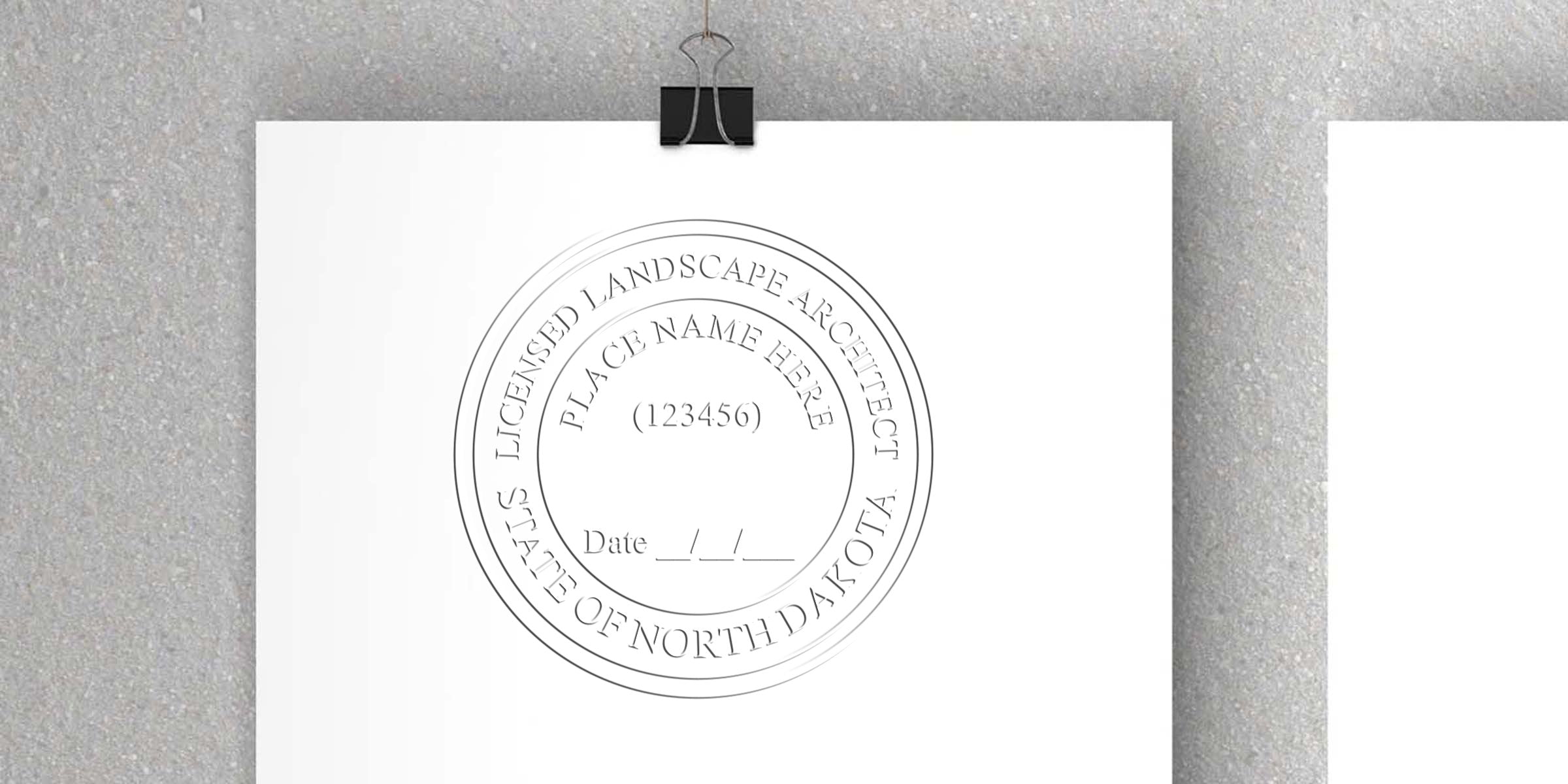
Ever feel stuck trying to ensure your official documents look professional and comply with North Dakota’s regulations? A north dakota landscape architect seal template can help you check both boxes with ease. It’s a straightforward way to stamp your authority on designs, reports, and any other project materials you handle. If you’ve been trying to figure out where to begin, this guide is here to point you in the right direction and help you feel more confident about every landscape architecture project you undertake.
Understand The Value Of A Professional Seal
You might wonder, “Why do I even need this seal?” It’s not just about meeting legal requirements. A professional seal also delivers a clear message: you take your role seriously and adhere to the highest standards of practice. In the world of landscape architecture, details matter, and so do appearances.
When you include a seal on drawings or official documents, you’re saying, “These plans have been reviewed, and they meet the criteria set forth by the state of North Dakota.” It builds trust with clients, contractors, and even the local community. In short, your seal is both an official confirmation and a personal signature that sets your work apart.
Credibility Boost
Clients want to be sure you’re operating at a professional level. Imagine having two sets of plans in front of you—one stamped in accordance with state guidelines, the other lacking any visible verification. Chances are, you’ll trust the stamped version because it signals credibility. It makes your service feel more legitimate and valuable, which can be a big plus when you’re bidding on new projects or trying to impress local review boards.
Document Integrity
Beyond trust and aesthetics, a proper seal ensures document integrity. You might be asked to show that your plans haven’t been altered without your approval. If you have a consistent system for securing your seal, whether in digital form or physical embossing, you’ll have a clear record of who authorized each page. That layer of security is especially reassuring when you manage multiple complex projects at once.
Know The North Dakota Requirements
Before you start using any seal or template, you need to know what the state requires. North Dakota, like most states, wants to protect public health, safety, and welfare. That’s why it has specific rules about what your seal can look like and how you should use it. If you fail to meet these guidelines, you could face penalties or invalidation of your work, so it’s really worth paying attention to all the details.
The Landscape Architecture Board Regulations
The North Dakota Board of Landscape Architecture typically sets the design standards for your seal, including size, shape, and any text that must appear. You’ll usually need your name, license number, and the phrase “Licensed Landscape Architect” or an equivalent. Keep in mind that even small deviations in spacing or font might cause issues.
For a deeper dive into all these specifics, you can check out the North Dakota landscape architect stamp requirements. It covers the precise guidelines, so it’s a solid move to read through that before finalizing your template.
Ensuring Accuracy
Double-checking your spelling, license number, and state references might sound obvious, but typos can happen under project deadlines. You definitely don’t want a misspelled name or an incorrect license number. That mistake could mean reprinting documents, or worse, facing a rejection from a regulatory agency. Take the time to verify every detail on your seal template to spare yourself a headache later.
Explore The Official Seal Template
Now that you understand what North Dakota requires, let’s look at the north dakota landscape architect seal template itself. You can find ready-made designs that closely align with the state’s rules. Your main task is to plug in your personal and licensing details and ensure everything meets the guidelines.
Where To Obtain Templates
Templates can come from a few different sources. Some professional associations offer standard designs to members. Online specialty retailers also have them available for quick download, often providing a proof so you can verify spelling and layout before you place a final order. If you prefer a physical stamp, you can often preview the template design as well, ensuring your seal meets both your aesthetic preferences and regulatory requirements.
Digital Seal Advantages
In today’s digital world, you’re probably sending lots of documents electronically. Having a compatible digital seal is a huge time-saver, so you can simply apply it in graphic form, then email or upload your plans without printing them out for a physical stamp. This process also reduces potential smudging or fuzzy ink stamps—which your client or regulatory board will surely appreciate.
Many providers include a digital version when you order a physical stamp, so ask about that option. It often comes as a high-resolution image file or vector graphic, which is perfect for layering onto PDF plan sets or design documents.
Steps To Personalize Your Template
You’ve narrowed down the template that fits the state’s guidelines. Next, you’ll want to customize it to reflect who you are as a licensed professional. This isn’t the time for flashy fonts or bright colors. Stick to the basics to comply with official rules.
Fill In Your Full Name
Ensure it matches exactly what’s on your license. Initials or abbreviations might not be acceptable, depending on how your license is documented.Add Your License Number
Check twice, especially if you’re new to the licensing system or you’re switching from a different state and juggling multiple numbers.Confirm Required Text
For instance, “Licensed Landscape Architect” is usually a must, along with “State of North Dakota.” The board guidelines will spell this out for you.Preview And Approve
Once you input the details, you’ll often receive a digital preview. Review it carefully for spacing, spelling, and format. Any small error here might cause unexpected print results.
Choosing The Right Format
You can typically choose from a few stamp formats:
- Pre-Inked: Allows you to stamp multiple documents in quick succession with crisp lines, but you’ll have to re-ink eventually.
- Self-Inking: Has a built-in ink pad. Good for moderate usage but can get messy if overused.
- Traditional Wood Handle: More classic style, needs a separate ink pad, often favored for occasional stamping.
- Digital Seal: Perfect for electronic submissions and editing.
The right fit depends on how often you’ll use the seal. If you issue dozens of documents each month, you might lean toward a pre-inked or self-inking style. For more casual stamping, a traditional wood handle might be enough.
Checking Font And Layout
North Dakota will typically request a legible, professional font. That means no playful typefaces like Comic Sans or overly elaborate cursives. Check the official guidance on font size—some boards want a specific millimeter requirement for letters to be clearly readable when photocopied. Also, watch out for text alignment, because crooked text can look unprofessional and might even be rejected by official reviewers.
Choose A Trusted Supplier
You’ve likely discovered that not all stamp providers offer the same quality. One reliable option is Acorn Sales, a trusted supplier for North Dakota Landscape Architect stamps and seals. Acorn Sales has been in business since 1964, so they’ve seen nearly every kind of stamping challenge you can imagine.
Why Choose Acorn Sales
Experience counts for a lot—especially when you’re dealing with licensing boards that can be particular about design specs. With a supplier like Acorn Sales, you know you’re getting a seal that meets North Dakota’s rules right out of the gate. You also have the option of a free digital seal with your purchase, so you’ll be covered for both paper and online submissions. Plus, ordering from a seasoned company means you can tap into their support resources if any questions pop up about usage or customization.
Additional Support Services
Sometimes, you might need help deciphering the exact requirements for your seal or verifying the board’s new guidelines. In those cases, a supplier with a long track record can step in. Acorn Sales offers helpful customer service to guide you through the entire process, from selecting the right stamp format to finalizing your digital seal. Even if you’re in a time crunch, knowledgeable staff can usually expedite your order or walk you through any last-minute checks.
Best Practices For Seal Usage
Once you’ve got your north dakota landscape architect seal template set up, you’ll want to use it effectively. It’s a powerful tool, but only if you maintain proper habits and follow state protocols. Consider these tips to keep everything legit.
Include On Official Documents
Always place your seal on final, official copies of your plans or documents that will be submitted for review or filed legally. Some architects also seal design sketches sent to clients—though that’s optional—just to show a mark of professionalism. If you’re sending files digitally, insert the digital seal in a consistent position on each page so it’s easy to spot.
Keep Up With Renewals
Your license isn’t usually forever. At some point, you’ll either have to renew your license or maintain continuing education credits. Be sure to track these deadlines. If your license expires, you’ll have to pause using your seal until you’re officially back in good standing. Update any change in license details on your digital seal or get a new stamp if needed.
Store Your Stamp Securely
Physical stamps can be easy to misplace in a busy office. Keep yours in a labeled drawer, especially if you have multiple professionals on the team. If you share an office, consider storing your stamps in a locked cabinet so only authorized individuals can use them. Digital seals also need security. Store the file in a secure folder, and limit its editing access.
Common Pitfalls And How To Avoid Them
Despite the best intentions, it’s easy to make a slip now and then. Here are a few common issues that could trip you up.
Using The Wrong Template
If you accidentally select a seal for a different state or a different profession, your documents might be invalid. Take a second to confirm it’s specifically designed for North Dakota landscape architects.Ignoring Spacing Requirements
Some boards have guidelines about how close the text within the seal can be to its outer edge. Double-check it matches official specifications.Placing Seal On Drafts
While there’s no absolute rule against marking drafts, it can create confusion for clients or reviewers who think they’re seeing final, approved documents. Instead, add “Draft” and keep your official seal off those pages until everything’s polished and ready to go.Failing To Keep Records
Each sealed document has significance. You may need to reference it later to answer design questions or confirm which version was submitted. Log each sealed document in case you’re asked to prove you followed consistent procedures.
Summary
North Dakota requires a professional seal to verify that your landscape architecture documents meet the proper regulations. A well-crafted north dakota landscape architect seal template not only keeps you in compliance but also showcases your credibility to clients and colleagues. Make sure you include your correct license information, verify the font and spacing, and choose a supplier you can trust.
In a nutshell, the process is pretty straightforward: follow the board’s rules, pick a template that matches those specs, and customize it with your details. Once you have your physical or digital seal (or both), use it wisely—only on final or official documents, and always keep it secure.
If you’re considering where to get your seal, Acorn Sales combines decades of experience with reliable products, plus a free digital seal so you can handle paper and electronic submissions. That’s one way to make your workflow smoother and your final plans more authoritative. By taking the right steps now, you’ll have an official seal that represents your hard-earned expertise for years to come.
Hopefully this helps you feel more confident about setting up and using your North Dakota landscape architect seal template. With the right knowledge and tools, you’ll be ready to stamp your designs with pride and accuracy. Here’s to your next project being smooth, secure, and totally official!
Frequently Asked Questions
How Do I Know If My Template Meets State Requirements?
Most reputable suppliers will verify that each seal design aligns with North Dakota’s guidelines. You can also reference the state board’s official rules—or consult resources like the North Dakota landscape architect stamp requirements—to confirm.
Can I Use My Existing Stamp If I Move To North Dakota?
You’ll likely need a new seal designed specifically for North Dakota, because that state has its own text, layout, and size requirements. Even if it looks similar, any variation might invalidate your documents.
What Happens If I Spell My Name Wrong On The Seal?
You’ll need to replace or reorder the stamp as soon as possible. An incorrect name can cause major headaches, such as document rejections or delayed approvals.
How Often Do I Need To Renew My License?
Renewal schedules vary. You’ll usually renew every few years and complete continuing education credits to keep your license active. It’s crucial to stay on top of any compliance dates so your seal remains valid.
Do I Really Need A Digital Version Of My Seal?
If you send PDF plans or other documents electronically, a digital seal makes life easier. It spares you from scanning stamped paper docs, and it ensures clarity for anyone who needs to review your submission remotely.








