
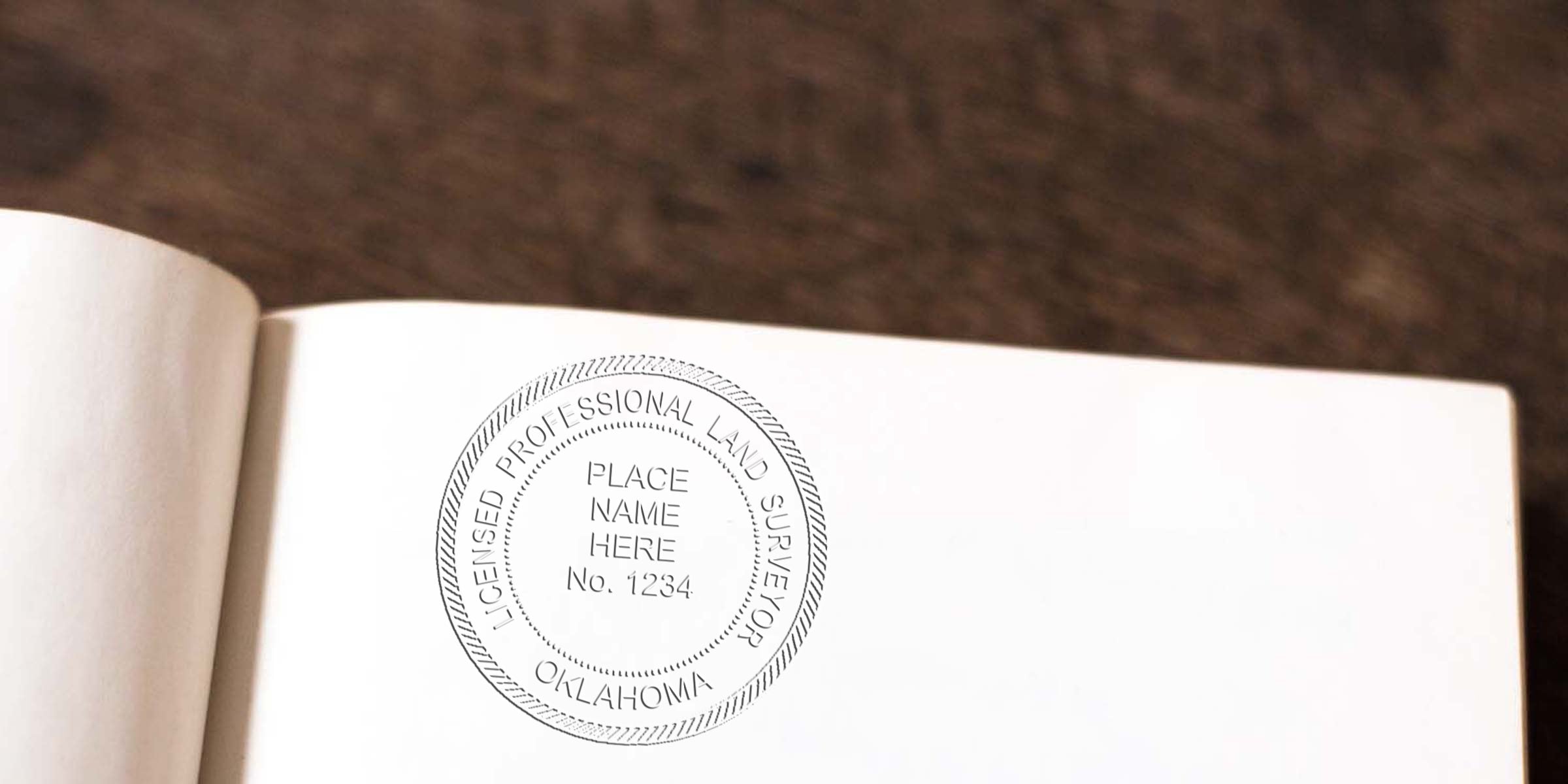
Understand the Purpose of Your Seal
Your Oklahoma land surveyor seal design is more than just a handy stamp. It symbolizes your expertise, verifies that your work meets state standards, and helps clients trust the official documents you produce. By clearly labeling maps and other land surveying materials, your seal lets people know a qualified professional is behind the project.
In Oklahoma, your seal must be legible, accurate, and compliant with state laws. Think of it like your personal signature in the field of surveying, but with even stricter requirements for layout and text. When you understand the purpose of your seal, you’re already on the path to ensuring every survey or legal document you sign off on has the professional credibility it needs.
Identify Key Design Elements
While the specifics can vary slightly, a few design elements typically show up on a proper Oklahoma land surveyor seal. You want to make sure these pieces are clear and consistent so that anyone who sees your stamp recognizes it instantly.
- Your full legal name
- The phrase “Professional Land Surveyor” or an acceptable abbreviation
- Your unique license or registration number
- The words “State of Oklahoma” to confirm jurisdiction
When done well, these core details create a cohesive look. Consider how readable your name and license number are. If the text feels cramped, it may be time to rethink your seal layout or choose a slightly larger design. For best results, keep typography consistent, and aim for clarity over intricate designs or fancy scripts. You have a small space to work with, so every letter matters.
Balancing Aesthetics and Compliance
It’s tempting to get creative with your seal, especially if you love artistic touches. But remember, the primary goal is for your stamp to be unambiguous. If readers can’t pick out your license number or the state name easily, the seal loses its official standing. A mild decorative border is often fine, but elaborate flourishes can clog up details.
You might also consider the final color of your impression. Dark ink, such as black or blue, ensures crisp contrast and stands out against various document backgrounds. Minimal or no shading works best, so your details remain clear when scanned or photocopied. After all, you might need to submit your records electronically, and crisp lines will preserve your information best.
Choose the Right Materials
The look and durability of your seal depend on the materials you select. The two broad categories are physical seals and digital seals. You’ll most likely need both, especially if you’re handling in-person paperwork and online documentation.
Physical Seal Options
Rubber Stamps
These are familiar, affordable, and easy to use. You’ll just need an ink pad, and you’re off to the races. Rubber stamps can be replaced or updated quickly if your details change.Pre-Inked or Self-Inking Stamps
These stamps store ink inside the handle, so you don’t need a separate ink pad. They often create a cleaner, more consistent impression while being slightly more expensive than standard rubber stamps.Embossing Seals
Embossers press a raised impression into the paper. They look classy, but you might need to emphasize clarity since raised text can be harder to read in photocopies. Sometimes, you’ll use an embosser alongside an inked stamp.
Digital Seals
With modern technology, you’ll often place a digital seal on your PDF documents and digital projects. A digital seal replicates your official stamp in electronic files, so you can certify documents without printing them out. One enormous perk is that many suppliers, such as Acorn Sales, offer a free digital seal when you order a physical counterpart. This can be a huge timesaver if your workflow leans heavily on electronic submissions.
Weighing Cost and Convenience
When deciding among these seal types, weigh how often you’ll use them and the nature of your fieldwork. If you frequently sign documents in the office, a pre-inked stamp might be your best friend. If you’re often surveying in the field, a sturdy rubber stamp or embosser stored in a protective case will handle a bit of rough travel. Whichever you choose, confirm that the seal’s diameter, text, and layout all align with current rules in Oklahoma.
Follow Oklahoma Rules
It never hurts to double-check official guidelines. The Oklahoma Board of Licensure for Professional Engineers and Land Surveyors might update requirements from time to time, or clarify how your name should appear. You don’t want to find out too late that your seal is missing a crucial element.
If you want a detailed rundown of specific regulations, consider reviewing the Oklahoma Land Surveyor Stamp Requirements. Familiarizing yourself with these guidelines helps you stay compliant. After all, if an improperly designed seal leads to rejected documents, you’ll waste time and resources fixing it later.
Importance of Consistency
Once you’ve confirmed that your design meets state requirements, keep it consistent. Using multiple seal designs can confuse clients and may even raise questions about authenticity. If you choose to update the look of your seal, retire the old ones fully and stick to the new layout across all your paperwork. This avoids any suspicion about which version of your stamp is valid.
Maintain a Professional Look
Beyond the legal elements, a neat, uniform stamp impression looks more credible. You’d be surprised how a smudged image or faint ink might cause someone to question the legitimacy of a survey. Thankfully, you can keep your seal crisp by following a few guidelines.
Tips to Keep Your Stamp Sharp
- Store your seal in a cool, dry place
- Clean the stamp surface if you notice dust buildup
- Replace or refill ink pads regularly, especially if impressions start to fade
- Test the stamp on scrap paper before you apply it to the real document
Digital seals also need a little care. Keep the file safe, and ensure you have password protection to prevent unauthorized access. In many ways, your digital seal carries the same weight as your physical stamp, so treat it with equal caution.
Routine Updates
Every so often, assess whether your seal still meets professional standards. If your license expires or you transition to a new license number, it’s time to redesign. Even if you just took a break from surveying, double-check everything is up to current rules before you jump back in. Staying on top of your seal upkeep means smoother approvals for you and zero confusion for your clients.
Locate a Trusted Supplier
Choosing the right supplier makes a big difference in your seal’s quality and longevity. Since 1964, Acorn Sales has specialized in creating professional seals and stamps that meet state board standards, including Oklahoma’s. You can customize your seal design, pick from different stamping materials, and even get a free digital seal when you order with them.
Why Acorn Sales?
- Decades of Experience: Established in 1964, so you know they’ve mastered the craft
- Variety of Options: Choose from rubber, self-inking, and embossing stamps
- Quick Customization: Your name, license number, and any unique text arranged exactly how you need it
- Free Digital Seal: Secure a versatile solution for online documentation without extra hassle
Partnering with a supplier who knows the ins and outs of Oklahoma land surveyor seal design spares you the headache of reprints. Plus, it’s nice to have a go-to source for any updates or replacements you might need over the coming years.
Map Out a Practical Workflow
Let’s face it: the best-designed seal in the world won’t help if you don’t have a smooth system for using it. Whether you’re stamping surveys, plats, or official letters, having a clear workflow ensures you stay productive and consistent.
Gather Your Documents
Get your forms, maps, or drawings ready. Double-check you have all the pages that require a seal.Inspect Your Tools
Make sure your ink pad or embosser is clean, or your digital file is ready to go. A smudge on the final page can mean reprinting the entire document.Position the Seal Carefully
Aim for a visible spot, typically near your signature or title block. Just make sure you’re not overlapping any key text or data.Check Legibility
Read the impression carefully. Can you see your license number? Is your name spelled correctly? If it’s an embossed seal, is the raised text distinct enough?Secure and Archive
After sealing, store your physical stamp in a safe spot. For digital files, keep them encrypted and backed up to avoid any risk of tampering.
By going through these steps each time, you’ll minimize the chance of error. Many surveyors then scan or photocopy the newly sealed documents for their records. This approach ensures you have a backlog of consistent, valid paperwork if any questions come up down the road.
Navigate Common Pitfalls
Even experienced land surveyors can trip up on small seal-related details. Here are a few common slip-ups and easy ways to avoid them:
Forgetting to Renew a License
Nothing kills the validity of a seal faster than an expired license. Keep track of renewal dates and update your seal design whenever your license status changes.-
Using Poor-Quality Ink
Pins and smudges might look harmless, but an unreadable seal could be rejected. Always invest in high-quality ink pads or cartridges. Misplacing the Seal
Accidents happen, but losing your stamp can lead to unauthorized use and potential legal headaches. Lock it up or store it where only you have access.Overlooking Digital Security
A digital seal file can be just as sensitive as a physical stamp. Use secure passwords, encrypted drives, or reputable software to keep your seal safe.
Staying mindful of these pitfalls goes a long way toward protecting your reputation. After all, the simplest errors sometimes cause the biggest headaches in professional practice.
Many suppliers, like Acorn Sales, offer a free digital seal file when you order a physical stamp. This digital file lets you place your official seal on PDF documents with the click of a button. It’s especially useful if you frequently submit reports and drawings electronically, saving you the hassle of scanning a stamped paper every time.
Your Next Steps
By mastering your Oklahoma land surveyor seal design, you make a strong statement about your professionalism. Double-check your key elements, pick the seal format that suits your workflow, and remember to stay up to date with regulations. A tidy, compliant seal puts clients at ease and ensures your work stands out as both trustworthy and accurate.
If you’re ready to create or upgrade your stamp, consider Acorn Sales for an option that meets all state requirements. With decades of experience, free digital seals, and a commitment to top-notch quality, they can help you finalize exactly what you need. Now that you’ve got the details down, you can seal your documents with confidence and focus on what you do best: delivering reliable land surveying services to the people who need them.
Frequently Asked Questions
Do I Have to Use a Specific Seal Size in Oklahoma?
The state board usually provides guidelines for overall dimensions. Many Oklahoma seals measure around 1 5/8 inches to 2 inches in diameter. However, you’ll want to confirm any updates through official state regulations or resources such as the Oklahoma Land Surveyor Stamp Requirements. Choosing a standard size ensures you can fit all required text without overcrowding.
Can I Design My Own Custom Artwork?
While there’s flexibility for minor design details, each required element must be legible and properly worded. You can add subtle borders or icons if they don’t distract from key text like your license number or “State of Oklahoma.” If you go too artistic, you might risk clarity issues, so it’s best to stay conservative.
Is an Embossing Seal Enough, or Do I Need Ink?
Embossers often look elegant, but some agencies request or prefer an inked stamp because it’s easier to photocopy or scan. You may want both, using the embosser for official hard copies and a rubber or self-inking stamp for duplicate documents. Double-check your clients’ needs and the specific requirement of any agency reviewing your work.








