
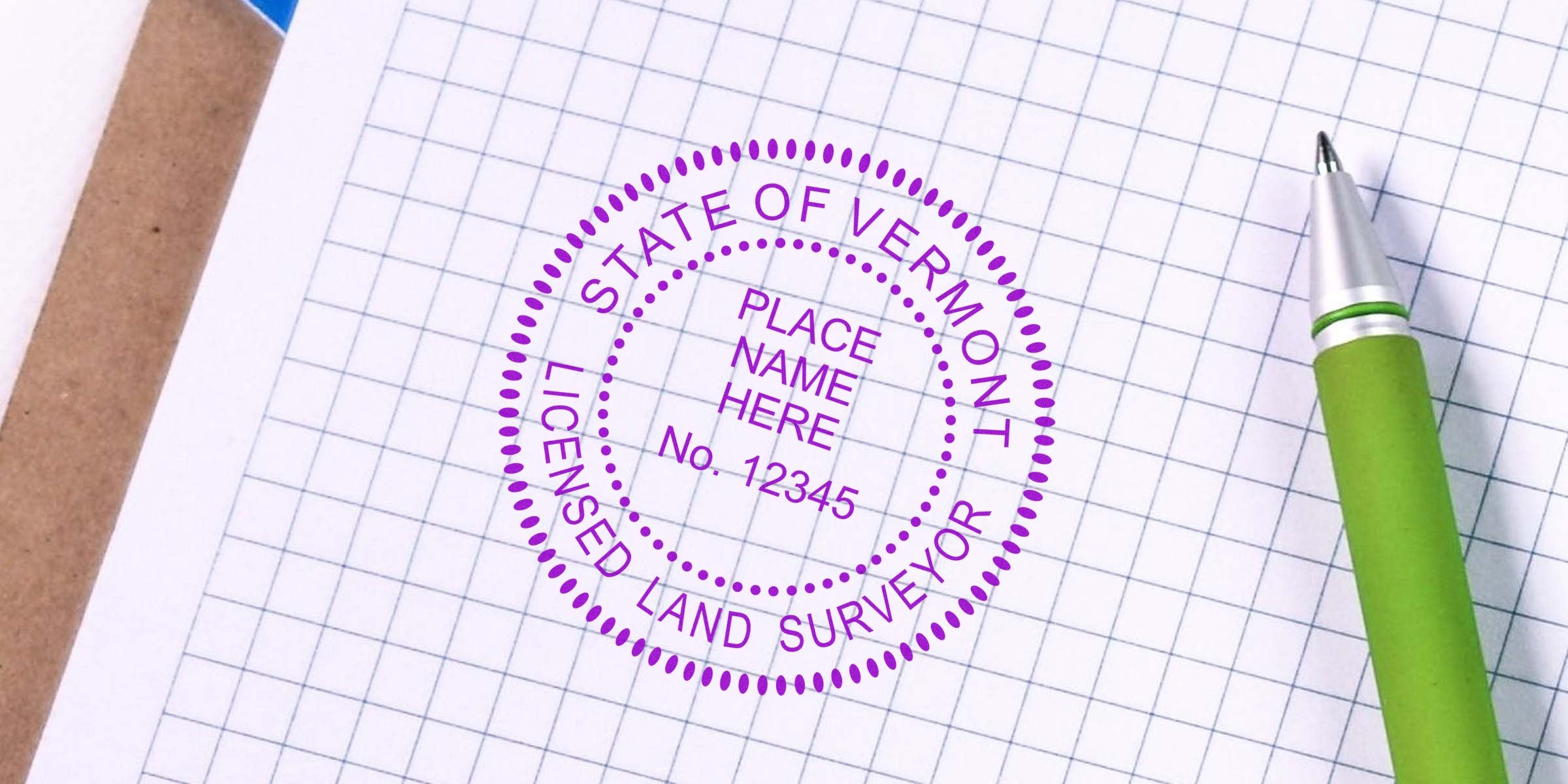
If you’re a new or experienced professional in Vermont’s land surveying field, you might be curious about creating your own Vermont Land Surveyor Seal Template. After all, having a compliant seal is one of the core responsibilities for land surveyors in the state. It not only identifies your work but also signifies professionalism and accountability. In this post, we’ll walk through everything you need to know—from the must-have elements of a proper seal to the simple steps to make your own. By the time you’re done reading, you’ll have the confidence to either design the seal yourself or know exactly what to request from a trusted supplier.
As you might already suspect, compliance isn’t just a formality. Your seal has legal implications if you plan to stamp official documents. However, it doesn’t need to be time-consuming or complicated to create one. Let’s walk through the essentials so your seal meets Vermont standards, looks professional, and keeps you on the right side of the regulations.
Understand Key Seal Requirements
Before you dive into designing your seal, it’s crucial to understand the rules laid out for Vermont land surveyors. Think of these requirements as a safety net. They help ensure that your seal communicates the right information and meets professional guidelines. It’s not just about looking official; it’s also about matching specific details required by state authorities.
-
Basic Professional Details
- Your name, exactly as it appears on your license or registration documentation.
- The words “Licensed Land Surveyor,” “Professional Land Surveyor,” or the official designation recognized in Vermont.
- Your license number, sometimes preceded by a shortened form like “No.” or “#.”
-
State-Specific Text
- The word “Vermont” typically appears within the seal’s outer ring or immediately below your name.
- Several states also include references to boards or committees (for instance, “State of Vermont” or “Board of Land Surveyors”). Check local guidelines to see if or how this applies to your seal.
-
Legibility Standards
- Lettering must be legible at standard reading distances.
- Your seal should remain clear even if you reduce it in size for smaller documents.
- Avoid stylized fonts that can make it hard to recognize letters.
-
Format and Shape
- Vermont often accepts either circular or rectangular shapes for surveyor seals, though the circular format is more common.
- Common diameters range from 1⅝" to 2". However, verify current rules in case of updates.
You’ll want to confirm all the state-based regulations and official guidelines before you finalize your design. For more specifics, you can also consult resources about vermont land surveyor stamp requirements to ensure you’re on track. This information will guide you in building a seal that’s both visually cohesive and fully compliant.
Gather Essential Materials
Once you’ve got your checklist of requirements, it’s time to gather the tools and references needed to create your Vermont Land Surveyor Seal Template. Even if you plan on using professional help later, it doesn’t hurt to have these materials on hand. Plus, it gives you a sense of control over the final product.
-
Official References
- Licensing Board Documents: Any official paperwork outlining font size, specific wording, or shape guidelines.
- Sample Seals: Sometimes, your local licensing board provides sample artwork or diagrams you can reference.
-
Graphic Design Software
- Programs like Adobe Illustrator, CorelDRAW, or even free tools like Inkscape can help you draft a clean design.
- If you prefer not to learn a new tool, you may use a web-based service that specializes in seal templates.
-
Your License Information
- Double-check your name as it appears on your license.
- Have your license number readily available, so you don’t mix up any digits.
-
Branding Elements (Optional)
- You might want your seal to match other branding pieces you use, like letterheads or business cards.
- If you use specific brand colors, gather those color codes to ensure a seamless look across your professional materials.
-
State Regulation Highlights
- Keep a short bullet list of must-haves (like “include the license number,” “include ‘Vermont’ in capital letters,” etc.) in front of you so that nothing falls through the cracks.
Before you start the actual design, make sure you’re comfortable with basic editing in whichever software you choose. If not, you can still lay out a rough concept and pass it along to a professional or a service that specializes in creating seals for land surveyors. Either way, having the items above within arm’s reach will make the process smoother.
Create Your Seal Template
Now comes the exciting part—putting everything together to form your Vermont Land Surveyor Seal Template. Whether you’re using design software, an online tool, or old-fashioned pen and paper before handing it off to a pro, a step-by-step approach can help you avoid headaches.
1. Start With a Blank Circle or Rectangle
Choose a shape that meets state guidelines. Most Vermont surveyors go for a circle with a certain diameter. Aim for something like 1⅝" or slightly larger. If you’re more comfortable with a rectangular stamp, confirm that it’s acceptable in Vermont. Then create a new document in your design software with the correct dimensions.
2. Insert Basic Text
Place the words “Vermont” and “Land Surveyor” (or the exact required phrase) in a circular layout along the top edge. This is usually done by creating a curved text path. Next, insert your name and license number along the bottom edge. Keep it symmetrical for a balanced appearance.
3. Add Optional Board Details
If required or recommended by state law, include “State of Vermont,” “Licensed Professional Land Surveyor,” or references to the governing authority. This might go around the outer ring or just below the top text. Check your official references to confirm the exact wording.
4. Adjust Font and Spacing
Make sure your text is large enough to be readable and meets official size requirements. A standard sans-serif font is often recommended; it’s clean and easy to read. Balance the text so it looks even around the circle or within the rectangle. Remember that a uniform border around your text, if visible, should be consistent.
5. Check for Legibility
Zoom out so your seal appears the size it would on a standard document. Can you still read the text clearly? If not, tweak the font size or spacing to enhance clarity. Keep it consistent with the official style guidelines.
6. Save and Export
After you’re happy with the design, save the original project file in case you need to make future edits. Then export your seal as a high-resolution image file (JPEG, PNG, or EPS) or vector format—some boards might require vector files for clarity. Having multiple file formats ensures your seal prints sharply on different types of documents.
7. Test Print
Before you finalize anything, do a quick print test on your home printer. This will let you see if the text is crisp and accurately sized. Sometimes, on-screen designs look good but reveal errors when printed.
At this point, you should have a solid working template. If you run into any troubles, don’t forget that professional services are just a phone call or click away. Many land surveyors prefer delegating the final design and production to a specialized supplier for maximum convenience.
Avoid Common Pitfalls
Designing a Vermont Land Surveyor Seal Template isn’t rocket science, but a few common mistakes can cost you time and frustration. Here’s what you should steer clear of:
-
Too Much Flair
- Adding decorative borders, extra lines, or fancy fonts can look cluttered and might even conflict with formal guidelines. Stick to a clean, professional style.
-
Misspelled Names or Numbers
- It sounds obvious, but double-check your spelling, license number, and any state references. Errors in your seal can invalidate your documents.
-
Illegible Fonts
- A script or overly stylized font might seem unique, but it can be tough to read. Use a simple font that’s easy to decipher at a glance.
-
Incorrect Dimensions
- Make sure your seal diameter or rectangle size matches Vermont requirements. Undersized or oversized seals can be rejected.
-
Neglecting Legal Updates
- Laws can change over time. If you’ve used the same seal for years, confirm that everything still matches the current codes. Periodic reviews help keep you compliant.
-
Not Testing the Printed Version
- It’s easy to rely only on a digital mockup. A physical print can reveal spacing issues or minor misalignments.
If you concentrate on accuracy, clarity, and compliance, you’ll be in good shape. The small details matter because they ensure your seal meets legal standards and protects your professional standing.
Get Professional Assistance
Imagine this scenario: you’re two days away from a big survey project, and you realize your new seal still needs finishing touches. Or maybe you simply don’t have the time to learn design software. There’s absolutely no shame in outsourcing the entire process to experts—it can save you time, and you’ll have confidence that your seal meets all the right criteria.
Professional Seal Suppliers
Companies like Acorn Sales have specialized in creating stamps and seals for over 60 years. They understand the ins and outs of state laws, so it’s pretty much a one-stop shop. You give them your details, and they produce a high-quality, ready-to-use seal.Free Electronic Seal
If you frequently submit digital documents, an electronic seal can be a game-changer. Acorn Sales offers a free electronic seal with every order, which means you can stamp PDFs or electronic submissions quickly without the extra cost. It’s worth exploring if you want a seamless workflow.Bulk or Package Deals
Some suppliers bundle a physical seal stamp with an embosser and a digital file. If you want multiple options for different tasks (like official embossing vs. quick ink stamping), a package might be more cost-effective.-
Customization and Branding
If you decide you want consistent branding across all your business materials—from letterheads to marketing brochures—you can work with a professional designer. They’ll refine your seal so it still follows state guidelines but also complements your overall identity. Turnaround Times
While designing your own seal might feel like a weekend project, professionals often work even faster and ensure compliance. You’ll typically receive a proof before anything is finalized—this step gives you the chance to catch any last-minute errors or tweaks.
If you’re serious about saving time or ensuring 100% compliance, it’s often simpler to hand the project over to a trusted supplier. By collaborating with an experienced vendor, you can rest easy knowing your Vermont Land Surveyor Seal Template meets every requirement, looks sharp, and is ready for immediate use.
Creating your own Vermont Land Surveyor Seal Template doesn’t have to be frustrating or time-consuming. By focusing on clarity, compliance, and quality, you’ll end up with a seal you can confidently use on official documents. And when in doubt, remember that professional suppliers like Acorn Sales are always ready to help, offering a free electronic seal with every order. Whether you design it yourself or rely on expert assistance, your final seal should serve as a proud marker of your professional status in Vermont.
Frequently Asked Questions
Can I Customize My Seal Design Beyond State Requirements?
” Yes, to some extent. You can choose a specific font or shape if it’s permitted, and you can often add small brand touches. However, the core information—your name, license number, and the word “Vermont”—must remain intact as per state guidelines.
Is It Better to Use an Embosser or a Stamp?
” It depends on how you plan to submit most of your documents. An embosser raises the paper surface, giving an authentic, official look. A rubber or self-inking stamp might be faster if you process a large volume of documents. Many surveyors keep both on hand. If you’re unsure, a supplier can advise you on which will best suit your workflow.
What Happens if My License Number Changes?
” Typically, your license number won’t change unless you face re-licensing procedures or major board updates. But if it does, you’ll need to update your seal immediately to stay compliant. Having a “master file” of your design makes this simpler. Some suppliers offer free or discounted seal revisions if you need updates in the future.
How Quickly Can a Professional Service Deliver My Seal?
” Turnaround times vary. Many suppliers ship custom seals within a few business days of approving your initial design proof. If you’re in a time crunch, you can often pay for expedited shipping or rush production. Always ask about timelines in advance, especially if you have an urgent project.
Does Acorn Sales Offer a Warranty or Guarantee?
” Acorn Sales is known for reliable products and great customer service. With over six decades of experience, they stand behind their seals and stamps. You can usually expect a satisfaction guarantee—details vary, so it’s recommended you confirm your specific order terms.








