
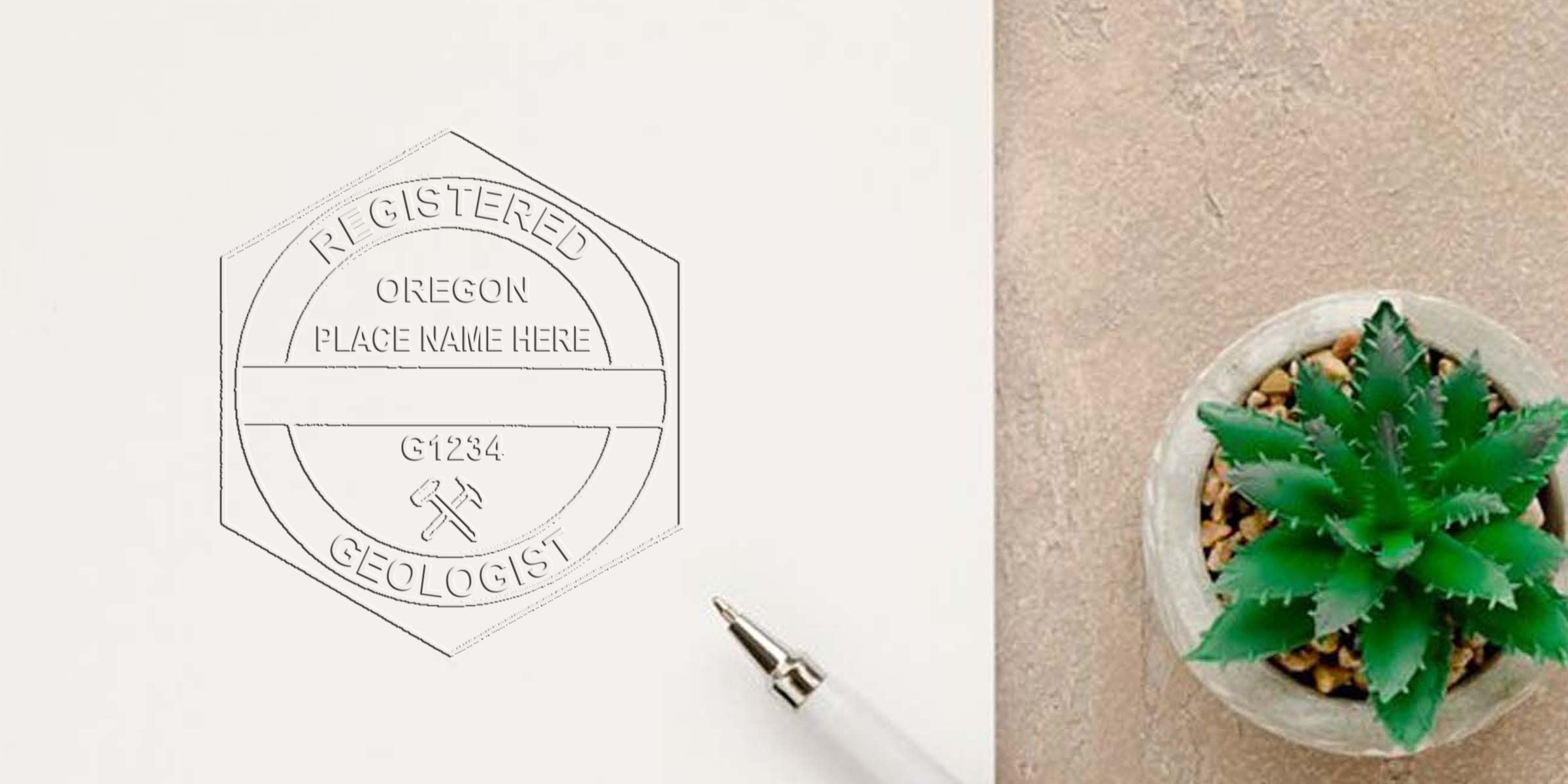
If you’re a practicing geologist in Oregon, you probably know there’s an important credential you can’t overlook: the official Oregon Geologist Seal. Whether you’re brand-new to the field or you’ve been at it for decades, this seal is essential for validating your professional work. In simple terms, it’s a legal mark ensuring that your reports and drawings meet the standards set by regulatory bodies. But there's more to it than ink and paper. To help you navigate the requirements comfortably, let’s take a closer look at what the seal is, why you need it, and how you can secure one for yourself.
At Acorn Sales, we’ve been making stamps and seals for more than 60 years. Our goal is to give you everything you need—from a quick, easy ordering process to a free digital seal—so you can meet Oregon’s professional guidelines without stress. Let’s dive into the details so you can feel confident about complying with the rules.
Understand the Official Seal
If you’re unfamiliar with the terminology, the second you hear “official Oregon Geologist Seal,” you might imagine a fancy emblem or a complicated design. In reality, the seal is a clear, standardized mark that proves you’re authorized to practice geology in Oregon. It typically includes your name, license number, and relevant wording that identifies you as a licensed geologist in the state.
Legal documents, plans, and reports often require this seal to confirm authenticity. When you stamp or emboss your signature on a geologic report, you’re stating that the information is accurate to the best of your professional knowledge. It’s like placing your personal guarantee on your work. Because of that, you want to make sure you follow all the specifications that come with producing and using the seal.
Why Does Oregon Require It?
Oregon’s geologist rules are designed to protect public health and safety. The official seal ensures transparency and credibility, so anyone reading or relying on your report knows it’s authored by someone with the right qualifications. Without it, your professional documents could be rejected, delaying projects or even introducing legal troubles. Basically, it’s not just a rubber stamp or an embossed impression—it’s a sign that you meet Oregon’s strict professional standards.
Physical vs. Digital
You may have seen both physical stamps and digital versions of the seal. A physical seal typically comes as a stamp (self-inking or pre-inked) or an embosser that creates a raised impression on paper. Digital seals, on the other hand, are electronic graphics applied to files like PDFs. They’re especially handy if you work remotely or deliver most of your documents via email. Many geologists like to keep both on hand because different projects call for different formats.
Meet Oregon Requirements
Before you place an order or design your seal, you should get a full picture of the rules. Oregon’s authorities, including the Oregon State Board of Geologist Examiners, outline specific guidelines on everything from content to legibility. While the details can vary, here are some common points:
- You must include your name exactly as it appears on your license.
- Your seal should display your Oregon-issued license number.
- The seal format should match state-required text (for example, “Registered Geologist” or “RG” as designated).
For more specific recommendations, take a look at the Oregon Geologist stamp requirements. It’s a resource that will walk you through the finer details, including spacing, sizing, and positioning. Having these guidelines handy from the start can save you a lot of time and hassle.
Double-Check the Text
Accuracy is key when it comes to seal text. A single misspelling can lead to rejections of your official documents, and that might hold up your projects or require costly reprints. If you accidentally leave out your license number or abbreviate something incorrectly, it might violate the rules. Whenever you fill out an order form for your seal—either physical or digital—be sure to review the text and confirm you’ve entered it correctly.
Staying Current
Let’s be honest, rules can change. Licensing boards occasionally update their regulations, which might affect the wording or style of your seal. It’s worth bookmarking the state board’s website and reviewing updates annually so you don’t miss important revisions. Otherwise, you could find yourself using an outdated seal that no longer meets requirements.
Choose the Right Format
You’ve settled on the wording, you’ve double-checked your license info, and now you’re probably wondering: which seal format do you actually need? The answer depends heavily on your workflow. Below are a few options to consider.
Physical Stamps
- Self-Inking Stamp: Contains an internal ink pad to make repeated impressions quickly. Good for high-volume stamping.
- Pre-Inked Stamp: More refined, often provides crisp details. Typically lasts for thousands of uses before needing a refill.
- Traditional Rubber Stamp: Requires a separate ink pad. Some geologists like the flexibility of choosing different ink colors or multiple pad types.
Embossers
- Handheld Embosser: Creates a raised impression, easily transported but may require a bit more physical force.
- Desk Embosser: Usually sits on your desk, offering a stable platform for professional-looking impressions. Ideal for large batches of documents.
Digital Seal
- Electronic Seal File: A digital image (often created in high resolution) that you can insert into documents.
- Custom Security Features: Some digital seals come with secure features, like password protection or embedded authentication.
If you’d like a digital seal at no extra charge, Acorn Sales provides a free digital version alongside our physical stamps. It’s a handy option if you do remote work, email your files, or simply prefer minimal paper usage.
Order Your Seal
Now that you know the format you want, you’re ready to take the next step: placing your order. While you can theoretically go to a local print shop, it’s almost always better to use a specialized provider. Why? A professional seal maker knows the ins and outs of state guidelines and can advise you if something looks off.
Why Choose Acorn Sales
We’ve been in business for more than 60 years, producing stamps and seals for countless professionals. Our team can guide you through the entire process, from confirming your text to ensuring your seal meets size and layout requirements. The best part? We offer a Free Digital Seal with your purchase, so you have both physical and digital formats at your disposal. This way, you can be sure you’re 100 percent compliant with whatever your next project demands.
Ordering Steps
- Gather Your Info: Make sure you have your license number, your full professional name, and any required design specifications.
- Choose the Product: Pick between a self-inking stamp, a pre-inked stamp, an embosser, or any combination.
- Submit Your Request: Fill out the order form, double-checking your details.
- Review Proofs (If Provided): Some suppliers, including us, can provide a digital proof of your seal.
- Wait for Delivery: Depending on shipping speeds, you’ll have your new seal in just a few days.
Once your seal arrives, give it a quick test. Stamp or emboss a scrap piece of paper and confirm all the details look correct. If something is off, let your supplier know immediately so any errors can be fixed swiftly.
Use Your Seal Properly
Nothing is more frustrating than having a valid seal but using it incorrectly. Each time you apply it to an official document, ensure the impression is sharp and legible. Smudgy or incomplete impressions can be rejected just as easily as incorrect text.
Guidelines for Document Stamping
- Always place the seal where it’s legible and noticeable.
- Avoid stamping over text or images that could reduce clarity.
- Keep the seal away from the page edge to avoid partial impressions.
Managing Digital Versions
If you’re using a digital seal, insert it in a standard location, like the bottom-right corner of a report cover page. Some geologists prefer adding it on the last page alongside their signature. Wherever you place the seal, make sure it’s large enough to read and not overshadowed by text boxes or images.
Record-Keeping
Each time you officially use your stamp—physical or digital—consider keeping a record. Logging project details and the date you applied your seal can protect you if questions come up later. Plus, having a neat paper (or digital) trail simplifies your routine licensing audits.
Summarize Key Points
By now, you’ve seen why the seal is a non-negotiable part of your professional practice in Oregon. From meeting state guidelines to ensuring that your documents stand up to scrutiny, the seal is your official mark of expertise. Here’s a quick recap:
- The official seal shows you’re an accredited geologist recognized by the state of Oregon.
- It must include the proper text, your name, and your license number.
- Different formats (self-inking stamps, embossers, digital files) all serve different workflows.
- Acorn Sales offers a free digital seal plus a range of physical seal options.
- Careful placement and usage of the seal will help avoid rejections and maintain your good standing.
Investing in a reliable seal is a smart move for your career. When you display that embossed stamp or digital file, you’re telling clients and reviewers that your work is backed by the highest professional standards.
These are simply different formats for applying your official mark. An embosser creates a raised impression (great for aesthetics and security), while a self-inking stamp applies ink directly. Some geologists prefer the clean, professional appearance of an embossed seal. Others like the efficiency of self-inking stamps. If you’re unsure, you can always talk to us at Acorn Sales for personalized recommendations.
Putting your seal on a professional document isn’t just a routine—it’s a statement of your credibility. If you’re ready to get started, be sure to gather the right license information, choose a format that suits your projects best, and check out the Oregon Geologist stamp requirements to confirm every detail. Remember, Acorn Sales is here to help you fulfill all your stamping and sealing needs, from physical products to free digital files. Ultimately, when your work bears the official Oregon Geologist Seal, you’re letting the world know you’re fully qualified, reliable, and dedicated to upholding the profession’s standards.
Frequently Asked Questions
Do I Need a Physical Stamp if I Have a Digital Seal?
That often depends on your specific projects and how the final documents are delivered. Digital-only submissions work in many cases, but some agencies or clients require hard copies with a stamped or embossed seal. Having both ensures you’re prepared for any scenario.
How Often Do I Need to Update My Seal Design?
Usually, you only need a new design if the state board changes its requirements or if your personal details (like your name) change. It’s wise to check official guidelines each year to confirm you’re using the correct format. If you notice any updates affecting your license information, reorder your seal right away.
How Do I Replace a Lost or Damaged Seal?
If your seal is lost, stolen, or severely damaged, you’ll need a new one as soon as possible. Contact your provider, verify your license information, and place an order for a replacement. In some cases, you might also need to notify the state board if there’s a security concern (for instance, if someone else could misuse your stamp).
Can I Personalize My Official Geologist Seal with Color Changes?
The state generally wants uniformity in seal designs, so major color changes could clash with rules. If you use a pre-inked or self-inking stamp, it typically comes in a standard color (like black or blue). Check the Oregon guidelines before making any artistic decisions. You don’t want your seal questioned because it looks too unconventional.








