
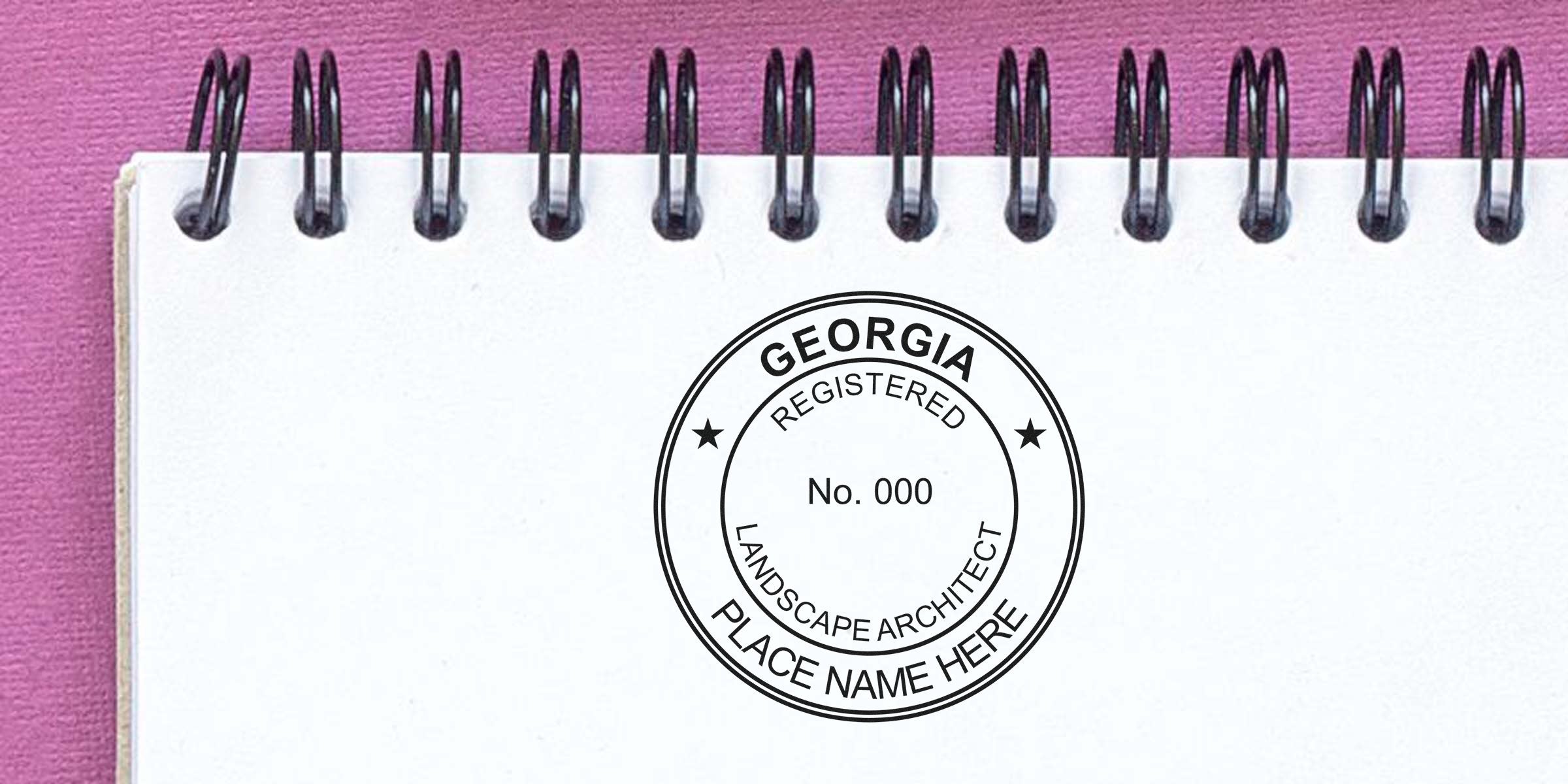
If you’re gearing up to practice landscape architecture in Georgia, crafting a proper Georgia landscape architect seal design is a critical step. Not only does it affirm your professional qualifications, but it also meets state requirements for stamping official documents. When you’re prepared with the right knowledge, you can create or order a seal that complies with the law and looks sleek on your project plans. Below, you’ll find a user-friendly checklist that helps you understand every stage of finalizing your seal design.
Set The Foundation
A professional seal isn’t just a formality. It’s a visual guarantee that you’ve met Georgia’s professional standards and that your work meets the fundamental regulations of the state. Before jumping into layouts and lettering, you’ll want to check the official guidelines that govern landscape architect stamps and seals. These regulations ensure uniformity across the profession, so every licensed architect’s seal carries the same legal weight.
At this stage, it helps to review:
- Any official documents from the Georgia Board of Landscape Architects
- Recent updates to stamping rules (on the chance requirements have changed)
- Sample seals from other professionals for inspiration
When you understand these fundamentals, you’re far less likely to waste time redesigning your seal later. A little planning up front saves a ton of hassle down the line.
Meet State Rules
Next, dive into the details of Georgia’s landscape architect laws. Requirements can vary from state to state, so you don’t want to assume that guidelines from another region apply to Georgia. Typically, you can find these rules in official handbooks or on the state licensing board’s website. If you’re unsure where to look, consider asking colleagues who have gone through the process or your local chapter of the American Society of Landscape Architects for direction.
Key points you’ll want to note:
- Whether the seal must include your full name and license number
- Specific diameter requirements (for both physical and digital seals)
- Required wording such as “Registered Landscape Architect” and “State of Georgia”
- Whether the seal must have a circular or rectangular shape, or if you have design flexibility
Meeting state rules now ensures your seal is accepted in official reviews. It also makes your life easier when you submit plans, since incomplete seals can lead to rejected documents or project delays.
Check Layout And Wording
After reading through all the requirements, it’s time to piece together your design elements. This is where you’ll plan out what text goes where, what the official wording should be, and how large each element must appear. You might notice your board’s policies call for specific phrases like “Registered Landscape Architect” or for the inclusion of your license number under your name. Stick to these phrases precisely, because a small oversight here can mean reprints or digital editing headaches.
Consider:
- Keeping your name prominent and easy to read
- Positioning your license number in a clearly visible spot
- Using standard fonts or letter sizes that meet legibility requirements
- Ensuring any decorative elements don’t overshadow required text
Once you have a layout that feels balanced, do a quick test by imagining how it’ll look when you stamp it on a plan or a contract. Your seal must appear crisp enough to read, whether on white bond paper or heavier card stock.
Select The Right Format
When you’re choosing between an embosser or an ink stamp, you’ll want to take function and presentation into account. Some professionals love the classy, raised impression of an embosser, while others need the adaptability of an ink stamp (especially if they frequently send digital copies). Here’s a quick breakdown of each format so you can see which might suit your needs:
| Format | Advantages | Considerations |
|---|---|---|
| Embosser | - Adds a professional raised impression | |
| - Difficult to forge | ||
| - Classic, elegant look | - Not always visible in scanned documents | |
| - Requires manual pressure, so it can be tricky on thicker sheets | ||
| Pre-Inked Stamp | - Crisp, consistent image | |
| - Minimal effort to apply | ||
| - Great for quick stamping | - Requires re-inking after extended use | |
| - Ink can bleed on certain paper types | ||
| Self-Inking Stamp | - Has built-in ink pad | |
| - Good for higher-volume stamping | ||
| - Quick and clean impressions | - Can dry out if unused for long periods | |
| - Might need occasional pad replacement |
If you need a physical impression for records or client presentations, an embosser might be the way to go. But if speed and easy readability on scanned documents are must-haves, an ink stamp or a self-inking stamp is likely more convenient.
Ensure Clear Legibility
No matter the format, clarity is crucial. An intricate design with fancy fonts may look artistic, but it could become an unreadable smudge after a few uses. Likewise, overcomplicating your seal can lead to confusion about your credentials. Aim for a clean, uncluttered layout so city inspectors, clients, and subcontractors can identify you at a glance.
Here are some handy tips:
- Avoid ultra-thin or curly fonts that blur easily
- Use consistent line thickness in both text and borders
- Size your letters to stand out, even when the seal is scanned or copied
- Test your seal on different paper types (especially thicker plan sets)
A neat seal shows you care about professional standards, which can boost trust among your clients and colleagues.
Explore Digital Options
These days, many architects opt for a digital seal that can be overlaid on project documents, PDF files, and other electronic formats. Georgia often allows digital seals under certain conditions, but you’ll need to confirm exactly how they should be used. If digital stamping is permitted, you can streamline the entire submittal process by eliminating repeated manual stamping.
Here’s why you might embrace a digital seal:
- Online submission of building plans: No need to snail-mail paper copies
- Faster collaboration with remote clients
- Easy revision control, since you can quickly update your documents without reprinting
Of course, you’ll still want a physical seal for those instances when a paper signature is required. But having a digital seal in your toolkit can save enormous time on routine tasks.
Partner With A Trusted Supplier
Locating a reputable vendor is a key step in designing and ordering your seal or stamp. You want someone who specializes in professional seals, understands Georgia’s regulations, and stands behind the quality of their products. At Acorn Sales, we’ve been in business since 1964, and we’re known for offering high-quality stamps and embossers for all sorts of professions. We also provide a free digital seal when you purchase a physical one, which can be a budget-friendly bonus.
Some benefits of working with an established supplier include:
- Product knowledge: They understand the nuances of fonts, sizes, and layouts
- Quality materials: Stamps and embossers that last, so you don’t face frequent replacements
- Custom support: Guidance if you’re unsure about your seal’s design
- Confidence: A proven track record and positive reviews from professionals in your field
If you’d like to take a closer look at specific options available for professionals in Georgia, you can check out our Georgia Landscape Architect Stamp.
Finalize And Test
Before you give your official go-ahead on the seal design, do a quick check. If you’re ordering a physical stamp or embosser, your supplier should give you a proof to review. Make sure your name is spelled correctly, the license number is spot-on, and every word matches Georgia’s requirements. A final test impression is invaluable, too, so you can confirm how comfortably the stamp or embosser works in your hand.
It’s worth printing or stamping a few test copies on the same media you’ll usually use:
- Review the impression in bright lighting to confirm it’s crisp.
- Scan or photocopy the stamped page to see if all details remain visible.
- Store a test sheet for your records in case you need reference later.
Once you’re satisfied, you can confidently move into production or finalize the digital file. That small extra step ensures you’re good to go on every official document ahead.
Wrap Up And Next Steps
You now have a plan to tackle your seal design. You’ve explored the basics of Georgia’s requirements, considered various formats, and learned how to verify clarity before locking it in. With the right partner, you’ll have peace of mind that your seal will arrive exactly how you want it—both in physical and digital forms.
If you haven’t yet reached out to a trusted supplier, this is the perfect time. After all, a professional seal is a visible testament to your qualifications and reputation. Whether you’re stamping major project files or everyday contracts, a crisp, compliant seal leaves a lasting impression on clients, colleagues, and regulatory bodies alike.
Ready to order, or simply want to chat through any lingering questions? Don’t hesitate to seek an experienced vendor who understands the Georgia landscape architect stamp and seal process. That last step is often the easiest part of this journey, especially when you’ve done the prep work to design a seal that meets all the rules.
At Acorn Sales, we offer top-notch customer support, plus a free digital seal when you order a physical one. We’ve been in business since 1964, which means we understand the ins and outs of professional sealing. Our reliable products and years of expertise help ensure you get a Georgia landscape architect seal you can trust for all your official documents.
Feel free to bookmark this guide for a quick refresher any time you need it. With your knowledge of the rules, plus a reliable supplier in your corner, you’re well on your way to stamping success in Georgia. Happy designing!
Frequently Asked Questions
Do I Need A Specific Size For My Georgia Landscape Architect Seal?
Yes. Georgia typically sets the diameter or dimension requirements for landscape architect seals, so you’ll want to confirm the exact measurement stated by the Georgia Board of Landscape Architects. Sticking to these size guidelines ensures your seal is accepted during official document reviews.
Can I Use A Digital Version Instead Of A Physical Seal?
It depends on which documents you’re working with. Many digital submissions are acceptable as long as your seal meets the official guidelines for electronic use. You’ll want to confirm current regulations to ensure your digital seal is fully approved and considered legally valid in Georgia.
Are There Specific Fonts I Must Use?
Georgia generally prioritizes legibility over strict font preferences. Still, you should stick to clean and professional fonts, making sure they’re easily readable in both print and digital forms. Check your board’s guidelines to see if they specify any particular styles.
How Do I Correct A Mistake On My Seal?
If you spot a misspelling or incorrect license number, contact your supplier immediately. Reputable vendors usually offer a proofing process, so you can correct any errors before your seal is produced. If the seal is already finalized, unfortunately, you’ll need to order a corrected version.








