
Learn The Basics
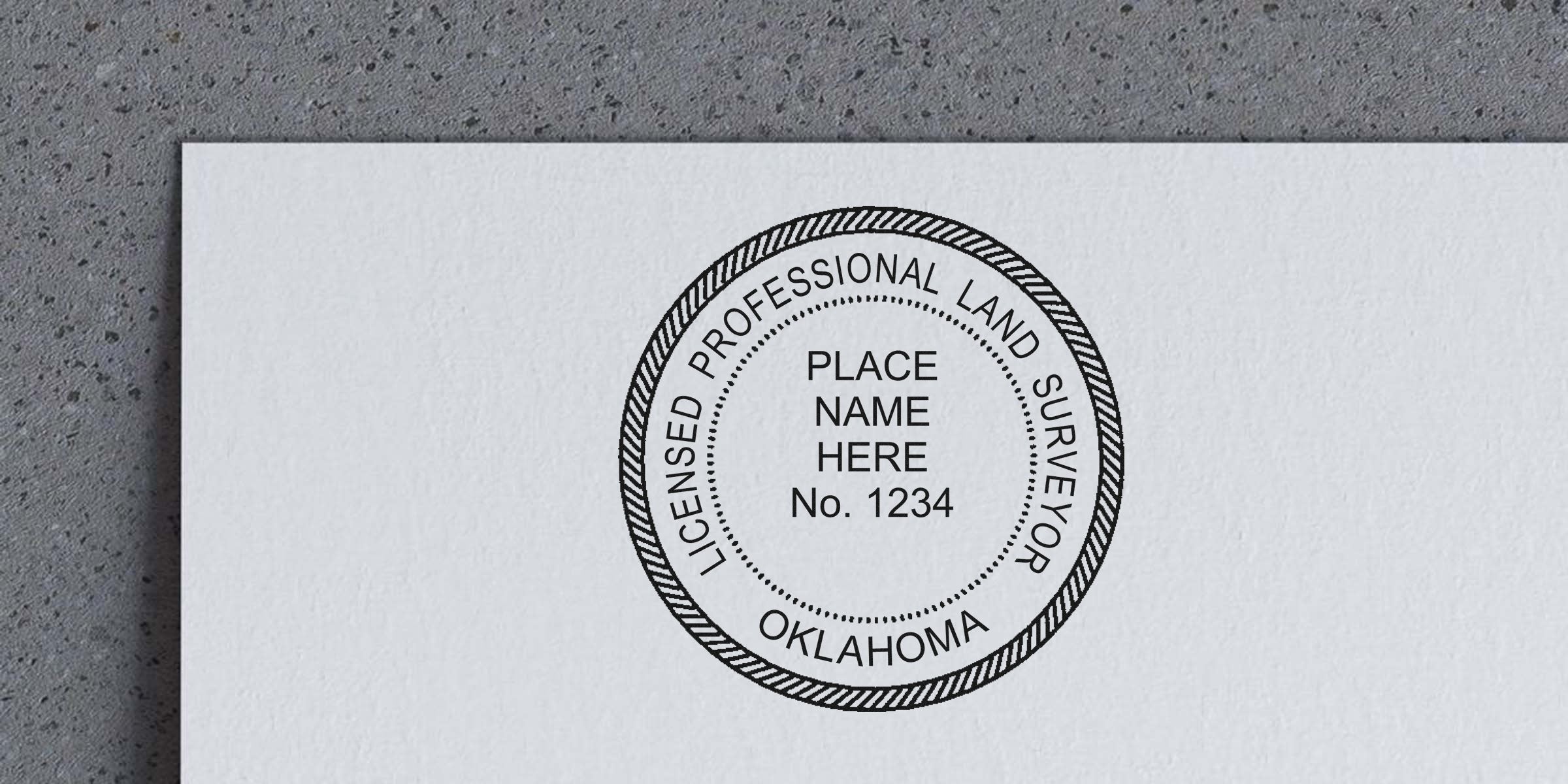
If you’re a land surveyor in Oklahoma, chances are you’ve come across the term “Oklahoma land surveyor stamp template.” You might be wondering what it is, where it comes into play, and how to make sure yours meets the state’s specific requirements. In short, a stamp template is the design layout that captures your professional details—your name, license number, and other mandatory elements—to produce a clear and compliant seal or stamp. Understanding this concept isn’t just a nice-to-have. It’s essential for your daily workflow, ensuring every report, map, or plan you sign is official and up to date.
Let’s be honest. Whether you’re new to the profession or you’ve been conducting surveys for decades, the rules for official stamps and seals can feel overwhelming. You might be juggling multiple projects at once, trying to ensure you fulfill client needs and abide by all state laws at the same time. A well-structured stamp template helps you streamline that process by eliminating guesswork. In the sections below, we’ll break down how these templates work, how to design them, and why it’s important to stay aligned with Oklahoma’s guidelines.
Understand Oklahoma Requirements
Whenever you affix a stamp or seal to a survey document in Oklahoma, you’re essentially validating the accuracy and authenticity of that data. The state wants to be sure that only qualified professionals—like you—are signing off on significant legal and financial matters. That’s why Oklahoma has regulations covering almost every detail of your seal, from the lettering size to the wording style. If you’d like a deeper look into these specifics, you can always check out the official guidelines on Oklahoma Land Surveyor Stamp Requirements.
To stay on top of these requirements, you’ll want to revisit them whenever you renew your license, take on a major project, or update your seal design. Rules can shift over time, and it’s always a good idea to confirm you’re still in compliance. Ordinarily, the state board outlines how your name, license number, and “Professional Land Surveyor” designation should appear on your seal or stamp. That might sound simple, but ignoring even a minor detail—like the thickness of the ring or the spacing between words—can cause snags when filing official documents.
Key Details To Check
- Proper license number format
- Exact phrase or designation (e.g., “Licensed Land Surveyor”)
- Required shape or border thickness
- Legibility rules for fonts and letter spacing
By keeping these points in mind, you avoid last-minute headaches when a county clerk or another official questions the legality of your stamp. Think of it as a practice run for any formal documentation. If your template meets the state’s guidelines, you’re golden.
See The Value Of Templates
A proper Oklahoma land surveyor stamp template gives you a head start on compliance. Picture it like a handy blueprint you can rely on each time you order a physical stamp or create a digital seal. It ensures the correct text arrangement, spacing, and artwork without you needing to puzzle it out from scratch. Plus, if standards ever change, all you do is update the master template rather than re-inventing the wheel.
Templates also help you build a consistent professional image. Your clients and peers will recognize that your seal always appears crisp, clean, and in the right configuration. This consistency can subtly boost your credibility. When stakeholders see that your official documents have zero errors or odd formatting issues, you stand out as a detail-oriented professional who invests in quality.
Template Advantages
- Consistent design across print and digital stamps
- Fewer errors when updating your seal
- Faster turnaround for future changes
- Easy proofing against state guidelines
When you’re juggling multiple tasks—fieldwork, data analysis, client meetings—having a template that’s already prepared can be a lifesaver. Rather than dealing with last-minute design changes, you can focus on delivering accurate surveys on time.
Create Your Custom Stamp
Building your own Oklahoma land surveyor stamp template can be simpler than you think. First, gather your essential details. That includes your license information, your exact name as it appears on state records, and any wording mandated by Oklahoma law. Then, pick a layout. Most designs feature a circular or rectangular border that encloses the text, so make sure you know which shape aligns with local guidelines.
Once you have these elements at the ready, it’s time to think about font size and letter spacing. You want every piece of text to be as clear as day. If you’re ordering a physical stamp, you may have the option to preview the design before it’s finalized. Make any tweaks—such as adjusting the border thickness—until everything feels perfect. This preview stage is crucial. You’ll thank yourself later if you catch small mistakes now rather than after you’ve stamped dozens of documents.
Steps To Design Your Stamp
- Collect all required details (license number, professional title).
- Choose a layout that aligns with Oklahoma regulations (circle or rectangle).
- Set your font style, size, and spacing to maximize clarity.
- Review a draft or proof before finalizing your stamp.
- Keep a digital version (template file) on hand for easy updates.
This process ensures your stamp meets the state’s expectations while still reflecting your personal style or branding. And speaking of personal style—just be mindful not to overdo it. Keep it professional. Save the fun designs for your personal holiday cards.
Stay Compliant With Rules
Even if you’re comfortable with the state requirements right now, it’s a good idea to stay vigilant. Requirements can shift, especially if the local board decides there’s a trend causing confusion. You might see new rules for border dimensions or updated language you must include on your seal. In these cases, your trusty template becomes your best friend again. Since you’ve already established a flexible layout, you can make changes quickly.
Additionally, be aware that electronic seals and signatures bring their own set of guidelines. Some states want surveyors to use a secure digital signature that ties directly to your professional license. Luckily, many of the same principles apply. Your digital seal should look just as sharp and meet all the textual requirements as your physical stamp does.
Proactive Compliance Tips
- Subscribe to official email bulletins for regulation updates
- Re-check your template annually or when renewing your license
- Keep a record of version changes so you know when each design was used
- Verify that digital seals align with your state’s e-signature policies
Staying informed protects both you and your clients. No one wants to spend time reworking documentation after discovering it’s been rejected due to a minor compliance issue. A quick review every so often helps you breathe easier.
Why Acorn Sales
Now you might be asking, “So where do I actually get a reliable Oklahoma land surveyor stamp template?” That’s where we at Acorn Sales come in. Our company has been a trusted supplier of high-quality stamps and seals since 1964. Over the decades, we’ve seen many shifts in regulations and technology, and we’ve continually adapted to meet surveyors’ needs. Our goal is to keep things ridiculously straightforward for you, from providing easy-to-follow templates to delivering sturdy, long-lasting physical stamps.
One of the perks we offer is a free digital seal. Need to add a professional mark to a PDF without messing around with bulky hardware? We’ve got you covered. Plus, when you order a physical stamp from us, you’ll have the confidence that it matches Oklahoma’s guidelines. We’ve spent years making sure the details—font height, border style, text arrangement—tick every box for compliance.
Our Key Advantages
- More than 50 years in business
- Complimentary digital seal to streamline your workflow
- Knowledgeable staff who stay informed on state regulations
- Durable products made for everyday professional use
Whether you’re just starting your land survey career or you’ve been at it for ages, our team at Acorn Sales is here to help lighten the load. We believe that the easiest path to compliance is a ready-made system that fits comfortably into your process.
We provide a complimentary digital seal with stamp purchases. Once you complete your order, our team sends you the file. It’s ready to drop into digital documents or attach to PDF drawings without any complicated setup. The result is consistent with your physical stamp, so everything looks professional no matter where it’s used.
Feel free to use these FAQs as a reference point whenever questions pop up. Cutting through the red tape can be easier than you think if you have the right resources at your fingertips.
In the end, you shouldn’t have to reinvent the wheel every time you validate a survey document. With a well-designed Oklahoma land surveyor stamp template, you ensure both legality and consistency in just a few seconds’ work. And with expert help from Acorn Sales, you’ll get both a high-quality physical stamp and a free digital seal to keep your workflow smooth. If you have any more questions, we’d love to hear from you, so don’t hesitate to reach out. Here’s to confident stamping—and many successful surveys!
Frequently Asked Questions
Can I Change My Stamp Design Over Time?
Yes. You’re free to update your Oklahoma land surveyor stamp template if your license details change or if regulations shift. Just make sure you stay aligned with current rules. It’s wise to routinely check for any new requirements, especially if you haven’t revised your stamp in a while.
Why Is Font Size So Important?
Font size impacts how your stamp reads on paper. If the text is too small or crowded, county clerks and clients might have a hard time verifying your license number. Clear, legible letters ensure your documents move smoothly through any official channels.
Do I Need Separate Seals For Digital And Physical Documents?
Some professionals use the same design in both realms, but the approach hinges on local electronic signature laws. In many cases, your digital seal can mirror your physical stamp in layout and text. Always confirm that your electronic process meets state rules for authenticity and security.








