
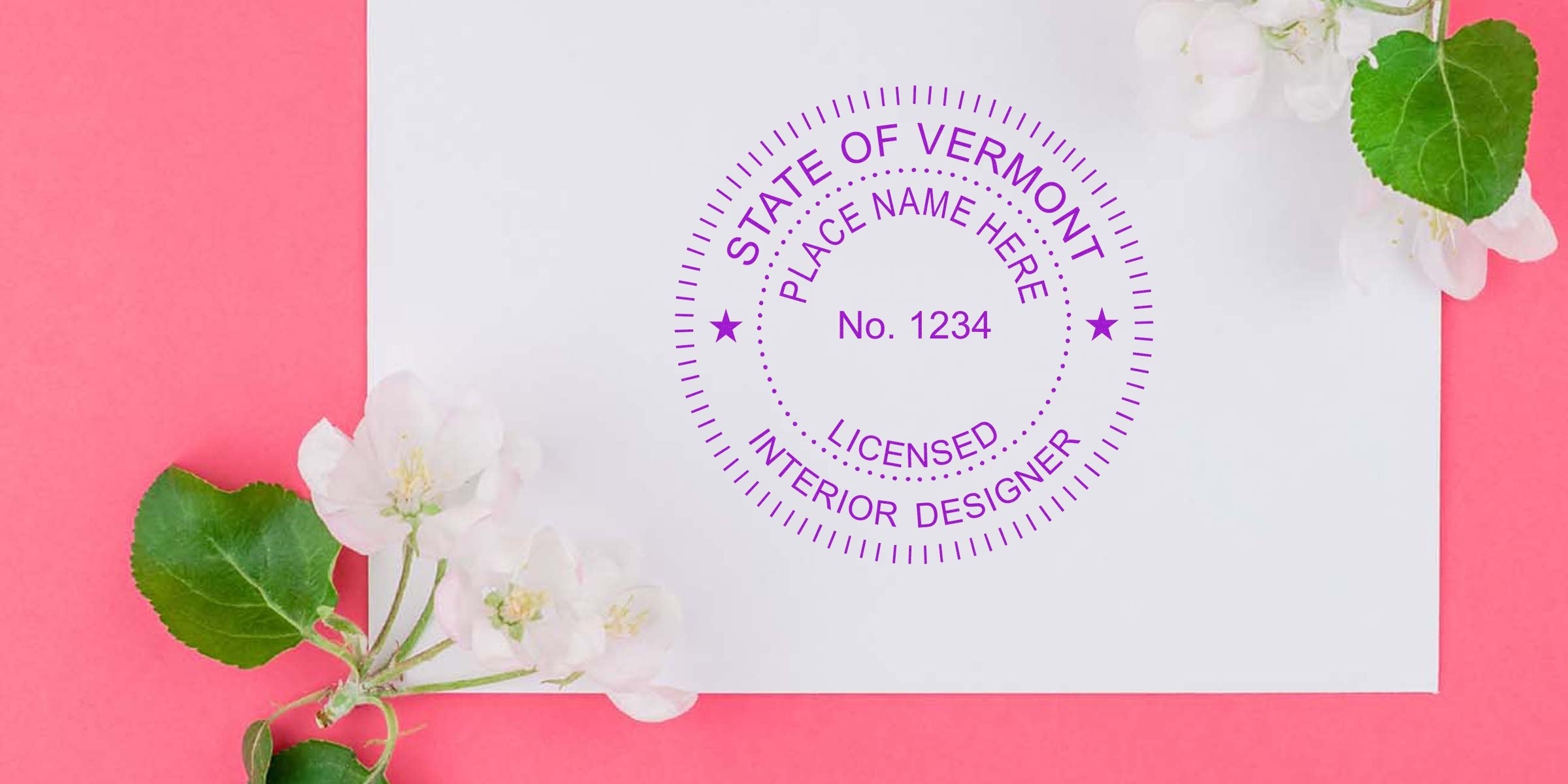
If you’re on the hunt for a Vermont Interior Designer Seal Template that meets professional requirements yet still feels entirely your own, you’re in the right place. Designing and ordering an official seal can be surprisingly simple, and it all starts with knowing what to look for when selecting your template. Whether you’re establishing your interior design practice in Vermont or simply updating your current seal, this guide will walk you through the essentials, highlight must-know rules, and share a few tips to help you make the best decision.
By the end, you’ll not only understand the nitty-gritty of Vermont’s stamp and seal guidelines, but you’ll also feel confident about picking the perfect design. Plus, you’ll discover an experienced provider, Acorn Sales, that can deliver a quality seal (including a free electronic version) to keep you on track.
Understand the Vermont Interior Designer Seal
The Vermont interior designer seal is a key piece of your professional toolkit. It indicates your credibility in a regulated field and ensures that your plans, drawings, and official documents are easily verifiable.
The Role of Official Seals
What’s the point of a seal, anyway? Picture your seal as a signature on steroids. It’s a recognizable marking that confirms your design documents come from a licensed individual. In Vermont, as in most places, government agencies and clients alike expect to see that unique imprint on your drawings or records. Without it, you might face paperwork delays or even compliance issues.
When you place your official seal on a design package, you’re essentially endorsing that the work reflects your professional judgment and understanding of Vermont’s building codes and regulations. It’s a small detail that carries a lot of weight.
Key Requirements to Keep in Mind
You’ll want to know the current rules for formatting and usage before finalizing your seal design. For the latest details, don’t forget to check out the vermont interior designer stamp requirements. Even if you already have a sense of the guidelines, it’s good to stay up-to-date in case of changes.
Commonly, your seal must include:
- Your name (exactly as it appears on your state license)
- Your valid license number
- The state name, “Vermont,” clearly visible
- Possibly the words “Interior Designer” or related terms, depending on local regulations
Because states can modify guidelines over time, make sure you confirm the current practice before committing to a final design. That way, you’ll avoid having to reorder a corrected seal down the road.
Recognize the Significance of a Robust Template
Ever feel overwhelmed by the variety of seal designs out there? A well-crafted template saves you time, helps you stay legally compliant, and ensures your paperwork always looks consistent.
Why Templates Simplify Your Workflow
Think of a ready-to-use template as the scaffolding for your seal. Rather than having to dream up a design from scratch, you start with a layout that meets state rules. That means you can more quickly customize your name, license details, and any optional stylistic touches. When your seal design is standard and consistent, you’ll build trust with clients and regulatory bodies alike.
Plus, the moment you finalize your Vermont interior designer seal, you can keep applying that same official stamp—or digital version—over and over. You won’t need to reinvent the wheel each time; just place your seal and move on to your next design project.
Core Elements of a Seal Template
No matter which template you decide on, you’ll likely see the following pieces:
- State Designation: “State of Vermont” or simply “Vermont.”
- Professional Title: This should reference “Interior Designer.”
- License Number: Carefully double-check that you’ve provided your exact state-issued number.
- Circle or Oval Layout: Many states traditionally use circular designs, but oval shapes or even rectangular borders may be permitted, depending on the regulations.
By ensuring your template covers these bases, you’ll find it much easier to produce a valid, professional-looking seal for your documents.
Explore the Types of Seal Templates
Not all templates are created equal. It’s smart to consider whether you prefer a physical stamp, an embosser, or a digital seal file. Maybe you’d like a combination of both.
Pre-Designed vs. Customized Options
- Pre-Designed: These are ready to go. Just plug in your name, license number, and any minor personal details, and you’ve got yourself an approved seal. Pre-designed templates are usually the most cost-effective and work well if you’re not fussy about altering the layout.
- Customized: If you want a specific font, fancy border, or an extra ring of text, a custom seal can match your aesthetic while still meeting Vermont’s rules. This option costs more time and money, but it can pay off if branding is high on your priority list.
Digital and Physical Variations
- Digital Only: Plenty of designers in Vermont rely on an electronic seal they can quickly place on PDFs and drawings. This is practical if you handle most of your documentation electronically.
- Physical Stamp or Embosser: If you regularly submit paper documents, a physical tool lets you literally stamp or emboss your seal on each page. The raised impression or neat ink marking feels official, and it’s often required for certain in-person filings.
- Bundled Options: Many providers, like Acorn Sales, can supply both a physical stamp and a digital file so you’re covered in all scenarios. With a free electronic seal thrown in, you’ll have ease and flexibility at your fingertips.
Factors to Consider When Choosing Your Stamp
Wondering how to choose one seal template among dozens? Focus first on practical factors, then consider any aesthetic details that matter to you.
Font and Layout Considerations
A crisp, clean font ensures that your license number and professional title are legible. Overly decorative fonts might bring a stylish flair, but they can be tough to read. Choose something that balances clarity with a hint of personality if you like that extra touch.
The layout should feel neat and spaced out, so letters don’t bleed together once stamped or printed. That tends to mean straightforward designs with minimal flourishes. Before final approval, you might test-print the seal in black and white to confirm nothing gets lost.
Durability and Quality
If you order a physical stamp, you’ll want reliable construction that doesn’t fade after a few uses or leave fuzzy edges on your design. Consider the following:
- Rubber Stamp with Wooden or Plastic Handle: Works with an ink pad. Ideal if you don’t need an embossed effect.
- Pre-Inked Stamp: Holds ink within the stamp itself, often yielding a crisp mark for thousands of uses.
- Embosser: Creates raised impressions. Seek out a sturdy metal build for smoother operation and longer product life.
If you go digital, make sure the electronic file has a resolution that won’t look pixelated when you resize it to different scales. That way, your online documents will remain sharp and professional.
Why Choose Acorn Sales
Picking out a seal template is important, but finding a trusted supplier to produce a top-notch product is just as vital. Acorn Sales is one name that often comes up in conversations about quality Vermont interior designer stamps and seals.
60+ Years of Expertise
Acorn Sales has been around for over six decades, which signals they know a thing or two about making professional seals. They’ve seen how design trends, regulatory guidelines, and client preferences have evolved, so they can guide you with ease. If you’re feeling lost or simply want advice on which style to pick, you can tap into their wealth of experience.
Free Electronic Seal
In our digital age, having a versatile electronic seal can be a game-changer. Not only do you save a ton of time—no more frantic searching for your physical stamp—but you also streamline your file submissions. Acorn Sales provides a free electronic seal with most orders, ensuring you have an immediate digital version ready to go. That means one less thing on your to-do list.
How to Order and What to Expect
Ready to invest in your Vermont interior designer seal template? The process is typically straightforward, but here’s a quick road map to keep you on track.
Simple Steps to Purchase
- Gather Your Info: Have your name and license details ready to ensure your seal is accurate.
- Pick the Template: Decide on a pre-designed or custom template. If you’re torn between two styles, you can always ask for expert input.
- Confirm Specs: Choose whether you want a rubber stamp, an embosser, or any add-ons like an extra ink pad.
- Submit Payment: Complete your purchase with your preferred payment option.
Once you follow these steps, you’ll typically receive a proof or preview of your new seal in a digital format. Double-check all the details. When everything looks perfect, give the final go-ahead.
Quick Turnaround and Shipping
Most reputable stamp providers, including Acorn Sales, aim for a speedy turnaround. In many cases, you can expect your seal to ship within a few business days of approval. Shipping times can vary, so be sure to plan accordingly if you have a tight deadline for an upcoming submission or client project.
If your situation is urgent, you might even be able to request rush service for an additional fee. Just ask ahead of time and see what’s possible.
Conclusion
Choosing the right Vermont interior designer seal template can feel like a breeze once you understand the core requirements, evaluate the different types of templates, and consider reputable suppliers. With the correct seal by your side, you’ll seamlessly mark your official documents, stay within state guidelines, and give clients an immediate sense of confidence in your professional services.
Don’t forget to finalize those details according to Vermont’s regulations—even small wording slips can cause major headaches. If you’re still uncertain, consulting the vermont interior designer stamp requirements is a smart move. And if efficiency plus quality is your goal, you can place your trust in a long-established company like Acorn Sales. They’ll equip you with a solid product, a handy free electronic seal, and over 60 years of expertise to back it up.
So why not take the next step? Grab your template, customize your name and license details, and get that perfect seal on order. Before you know it, you’ll be confidently stamping (or digitally signing) your way through successful interior design projects across Vermont.
Frequently Asked Questions
How Do I Know My Seal is Compliant With Vermont Regulations?
The first step is to review the vermont interior designer stamp requirements. Look for specific details on wording, layout, and size. Always verify that your seal includes your full name, license number, and the correct professional designation.
Do I Really Need Both a Physical Stamp and a Digital Seal?
It depends on how you submit documentation. If you often file paper documents, a physical embosser or stamp is a must. However, electronic seals are phenomenal for digital submissions and quick turnarounds. Many designers prefer having both options available.
Is It Worth Investing in a More Expensive, Customized Template?
If you love a unique look or want a seal that fits your personal brand, a custom template may be worthwhile. That said, a standard pre-designed template can save you money, and it will still meet Vermont’s legal requirements.
Are There Size Restrictions for the Stamp or Embosser?
Specific dimensions can vary, but most states prefer a seal diameter around 1¾ to 2 inches. Check Vermont’s guidelines for exact numbers. Make sure your chosen design matches the recommended size to avoid an illegible seal.
How Long Does a Stamp or Embosser Typically Last?
With proper care, a good-quality stamp or embosser can last for years. Maintaining it involves keeping the stamp clean, avoiding extreme heat or moisture exposure, and replacing ink pads or toner as needed.








